> For the complete documentation index, see [llms.txt](https://docs.trustlesswork.com/trustless-work/llms.txt). Markdown versions of documentation pages are available by appending `.md` to page URLs; this page is available as [Markdown](https://docs.trustlesswork.com/trustless-work/v2-en/introduction/stellar-and-soroban-the-backbone-of-trustless-work/stellar-wallets/freighter-wallet.md).
# Freighter Wallet

Freighter is a **browser extension wallet** for Stellar. It is a non-custodial wallet extension for your browser.
***
## **What You’ll Learn**
* How to install and set up Freighter Wallet.
* How to connect Freighter Wallet to Trustless Work.
* Useful resources, security tips, and FAQs.
***
## **Installation**
### **Step-by-Step Instructions:**
1. Open the official [Freighter Wallet website](https://www.freighter.app/).
2. Click on **"Add to Browser"** for your preferred browser (e.g., Chrome, Brave, or Firefox).
* Ensure you download only from the official website to avoid scams.
3. Follow the browser prompts to install the extension.
4. After installation, pin the Freighter extension for easy access.

***
## **Setting Up Freighter Wallet**
### **Creating a New Wallet**
1. Open the Freighter extension by clicking on its icon in your browser.
2. Click on **"Create New Wallet"**.
3. Set a secure password (store this password securely).
4. Freighter will generate a **Recovery Phrase** (also called a Seed Phrase).
* Write it down and store it in a safe place. **Do not share it with anyone**.
 
### Fund your Testnet account
You need a funded Testnet account to submit transactions and pay fees.
1. Open the Freighter extension.
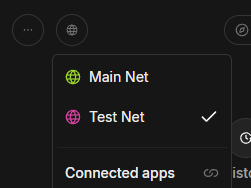
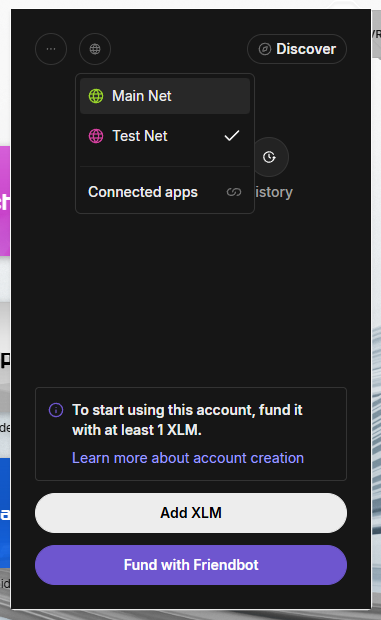
2. Switch the network to **Testnet**.
3. Click **Fund with Friendbot**.
4. Wait for the balance to appear.
5. Your account is now active on Stellar Testnet.
{% hint style="info" %}
Friendbot only works on **Testnet**. If you don’t see the button, verify the network first.
{% endhint %}
Friendbot fallback (manual)
If the in-wallet Friendbot flow fails, you can request funds directly:
1. Copy your account address (your public key) from Freighter.
2. Open: `https://friendbot.stellar.org/?addr=YOUR_PUBLIC_KEY`
3. Replace `YOUR_PUBLIC_KEY` with your address and load the URL.
### **Importing an Existing Wallet**
1. Open the Freighter extension.
2. Click on **"Import Wallet"**.
3. Enter your existing Seed Phrase and set a password.

***
## **Connecting Freighter to Trustless Work**
1. Navigate to the Trustless Work platform.
* Example link: [Trustless Work](https://dapp.trustlesswork.com/).
2. Click **"Connect Wallet"** in the top-right corner of the page.
3. Select **"Freighter Wallet"** from the list of options.
4. A pop-up will appear from Freighter asking for confirmation.
5. Approve the connection in the wallet extension.
 
### **Note:**
* Ensure Freighter is set to the correct network (Testnet or Mainnet) based on your environment. You can toggle the network in the Freighter settings.
***
## **Best Practices and Security Tips**
* **Backup Your Seed Phrase:** Store it in a secure, offline location.
* **Use Testnet for Development:** When testing or experimenting, always switch to the Testnet to avoid losing real funds.
* **Enable Browser Security Features:** Avoid installing unknown browser extensions that could compromise your wallet.
***
## **Useful Links and Resources**
* **Official Website:** [Freighter Wallet](https://www.freighter.app/)
* **Documentation:** [Freighter GitHub Repo](https://github.com/stellar/freighter)
* **Testnet Tokens:** [How to Get Testnet Tokens](/trustless-work/v2-en/introduction/stellar-and-soroban-the-backbone-of-trustless-work/testnet-tokens.md)
* **Troubleshooting:** [Troubleshooting & FAQs](/trustless-work/v2-en/support/troubleshooting.md)
***
## **Frequently Asked Questions**
### **Q: What happens if I lose my recovery phrase?**
* Your recovery phrase is the only way to restore your wallet. If it’s lost, your funds cannot be recovered.
### **Q: How do I switch between Testnet and Mainnet?**
1. Open the Freighter extension.
2. Click on the settings icon.
3. Toggle between Testnet and Mainnet in the dropdown.
---
# Agent Instructions
This documentation is published with GitBook. GitBook is the documentation platform designed so that both humans and AI agents can read, navigate, and reason over technical content effectively. Learn more at gitbook.com.
## Querying This Documentation
If you need additional information that is not directly available in this page, you can query the documentation dynamically by asking a question.
Perform an HTTP GET request on the current page URL with the `ask` query parameter, and the optional `goal` query parameter:
```
GET https://docs.trustlesswork.com/trustless-work/v2-en/introduction/stellar-and-soroban-the-backbone-of-trustless-work/stellar-wallets/freighter-wallet.md?ask=&goal=
```
`ask` is the immediate question: it should be specific, self-contained, and written in natural language.
`goal` is optional and describes the broader end goal you are ultimately trying to accomplish on behalf of the user. GitBook uses it to tailor the answer towards what is most useful for that goal.
The response will contain a direct answer to the question and relevant excerpts and sources from the documentation.
Use this mechanism when the answer is not explicitly present in the current page, you need clarification or additional context, or you want to retrieve related documentation sections.