> For the complete documentation index, see [llms.txt](https://docs.trustlesswork.com/trustless-work/llms.txt). Markdown versions of documentation pages are available by appending `.md` to page URLs; this page is available as [Markdown](https://docs.trustlesswork.com/trustless-work/v2-en/use-cases-by-indutry/security-deposits.md).
# Security Deposits
Security deposits are a common requirement in rentals—whether it's housing, co-living spaces, equipment, or other real-world use cases. Trustless Work makes them **fair, transparent, and automated** using smart escrows.
With Trustless Work, platforms can configure non-custodial smart contracts that define exactly how and when security deposits are returned or withheld.
***
### Example Scenario
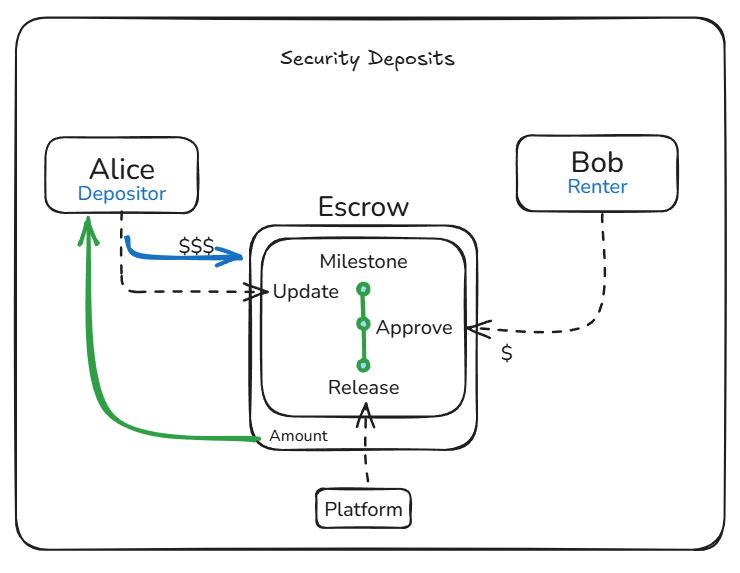
**Alice** rents a unit on a co-living platform. She deposits $500 USDC as a security deposit. At the end of her stay, she wants the deposit refunded—assuming there’s no damage.
***
### Escrow Configuration
| Role | Address |
| ---------------------- | ------------------- |
| **Depositor** | Alice |
| **Milestone Marker** | Alice or Platform |
| **Milestone Approver** | Bob (Landlord/Host) |
| **Release Signer** | Platform |
| **Receiver** | Alice |
***
### Escrow Lifecycle
1. **Initiation**\
The platform configures the escrow with all required roles using Trustless Work’s API.
2. **Funding**\
Alice deposits $500 USDC into the escrow. The funds are held in a neutral smart contract.
3. **Milestone Update**\
After Alice’s stay ends, either Alice or the platform marks the milestone as *"Request Refund."*
4. **Approval**\
Bob inspects the property:
* If everything is fine: Bob **approves** the refund.
* If there are issues: Bob can **reject** or request a partial refund.
5. **Release**\
The platform (as **Release Signer**) finalizes the release:
* 100% refund to Alice if approved.
* Partial refund based on agreement.
* Escalation possible if a dispute arises.
***
### Benefits
* **Trustless & Transparent**: Smart contracts define rules upfront; funds are never held by the platform.
* **Customizable Logic**: Platforms can set deadlines, approval rules, or automatic fallback releases.
* **Global by Default**: Uses stablecoins on Stellar for fast, low-fee cross-border payments.
* **Flexible Roles**: Easily supports different dispute flows—platform-led, DAO-governed, or peer-to-peer.
***
### Optional Enhancements
* **Dispute Resolver Role**: Add an arbiter or DAO to resolve conflicts.
* **Time-Based Auto Approval**: If Bob doesn’t respond in X days, the contract automatically refunds Alice.
***
### Live Use Case: SafeTrust
> SafeTrust is a platform for co-living spaces that uses Trustless Work to manage security deposits. By using smart escrows, SafeTrust ensures that all tenants receive fair treatment while reducing operational overhead for hosts.
---
# Agent Instructions
This documentation is published with GitBook. GitBook is the documentation platform designed so that both humans and AI agents can read, navigate, and reason over technical content effectively. Learn more at gitbook.com.
## Querying This Documentation
If you need additional information that is not directly available in this page, you can query the documentation by asking a question.
Perform an HTTP GET request on the following URL with the `ask` and `goal` query parameters:
```
GET https://docs.trustlesswork.com/trustless-work/v2-en/use-cases-by-indutry/security-deposits.md?ask=&goal=
```
`ask` is the immediate question: it should be specific, self-contained, and written in natural language.
`goal` is what the user is ultimately trying to achieve, the reason they need the answer. Sharing it helps GitBook give you a better, more relevant answer. A goal is most helpful when it describes the outcome the user wants rather than restating the question. For example, with `ask=how do I create an API token`, a goal like `automate deployments from our CI pipeline` lets GitBook tailor the answer to that use case.
The response will contain a direct answer to the question and relevant excerpts and sources from the documentation.
Use this mechanism when the answer is not explicitly present in the current page, you need clarification or additional context, or you want to retrieve related documentation sections.